03. Python-Programming(Introduction)(Turtle, Remove special characters)
03. Python-Programming(Introduction)(Turtle, Remove special characters)
[toc]
파이썬(입문) 과제3
로또번호 추출 프로그램
# 코드 import random def getNumber(): return random.randrange(1, 45) lotto = [] num = 0 print("로또 추첨을 시작합니다.\n") while True: num = getNumber() if lotto.count(num) == 0: lotto.append(num) if len(lotto) >= 6: break print("추첨된 로또 번호 ==> ", end='') lotto.sort() for i in range(0, 6): print("%d " % lotto[i], end='') # 결과 로또 추첨을 시작합니다. 추첨된 로또 번호 ==> 11 20 23 32 33 40 문자열을 거꾸로 뒤집고 홀수번째 문자를 ‘#’으로 바꾸는 코드
# 코드 inStr = "Hi_My_name_is_YoungHoon" outStr, count = "", 0 count = len(inStr) for i in range(0, count): if i % 2 == 0: outStr += inStr[count - (i + 1)] else: outStr += "#" print("원본 내용 --> %s" % inStr) print("변경 내용 --> %s" % outStr) # 결과 원본 내용 --> Hi_My_name_is_YoungHoon 변경 내용 --> n#o#g#u#Y#s#_#m#n#y#_#H 특수문자 제거하는 코드
- 좀 중요해서 여러가지 코드를 가져왔다.
코드1(for)
# for문 사용 a = "파이썬 ### YoungHoon $$$ @@@ 열공중 1234" for character in string.punctuation: a = a.replace(character, '') print(a) # 결과 파이썬 YoungHoon 열공중 코드2(regular expression)
# 정규표현식 사용 a = "파이썬 ### YoungHoon $$$ @@@ 열공중 1234" output_string = re.sub(r'[^\w\s]', '', a) print(output_string) - 좀 더 효율적으로 하기 위해 정규표현식을 컴파일하는 것이 좋다
a = "파이썬 ### YoungHoon $$$ @@@ 열공중 1234" pattern_punctuation = re.compile(r'[^\w\s]') output_string = pattern_punctuation.sub('', a) print(output_string) # 결과 파이썬 YoungHoon 열공중 코드3(translate())
# translate()함수 사용 a = "파이썬 ### YoungHoon $$$ @@@ 열공중 1234" output_string = a.translate(str.maketrans('', '', string.punctuation)) print(output_string) # 결과 파이썬 YoungHoon 열공중 turtle 프로그램으로 원모양 글자 그리기
import turtle import random from tkinter.simpledialog import * import math ## 전역 변수 선언 부분 ## inStr = '' swidth, sheight = 300, 300 tX, tY, txtSize = 0, 0, 20 radius, angle, radian = 100, 0, 0 ## 메인 코드 부분 ## turtle.title('거북이....') turtle.shape('turtle') turtle.setup(width=swidth + 50, height=sheight + 50) turtle.screensize(swidth, sheight) turtle.penup() inStr = askstring('문자열 입력', '거북이 쓸 문자열을 입력') angle = 360 / len(inStr) for ch in inStr: radian = 3.14*angle/180 tX = radius*math.cos(radian) tY = radius*math.sin(radian) r = random.random() g = random.random() b = random.random() turtle.goto(tX, tY) turtle.pencolor((r, g, b)) turtle.write(ch, font=('맑은 고딕', txtSize, 'bold')) angle += 360 / len(inStr) turtle.done() 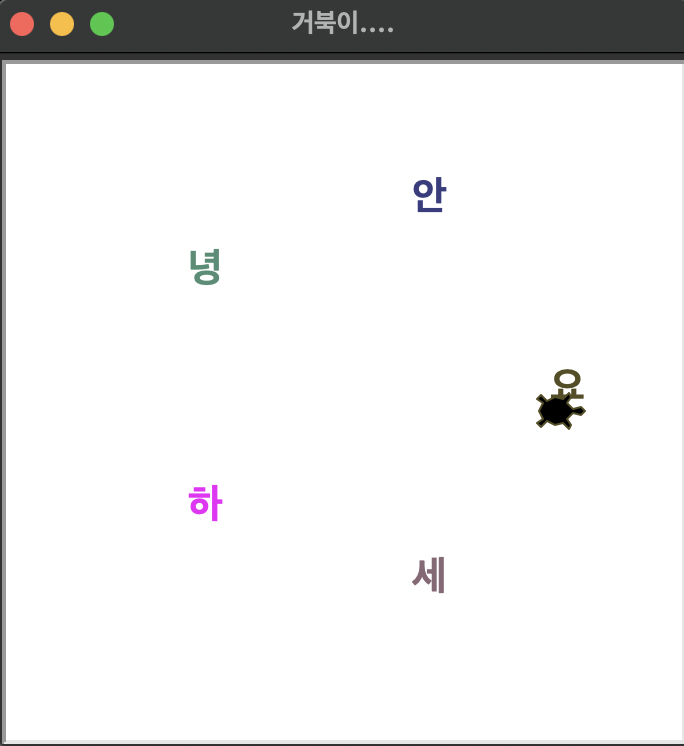
End.